IRRBB Reporting Generation
Reporting Generation tab
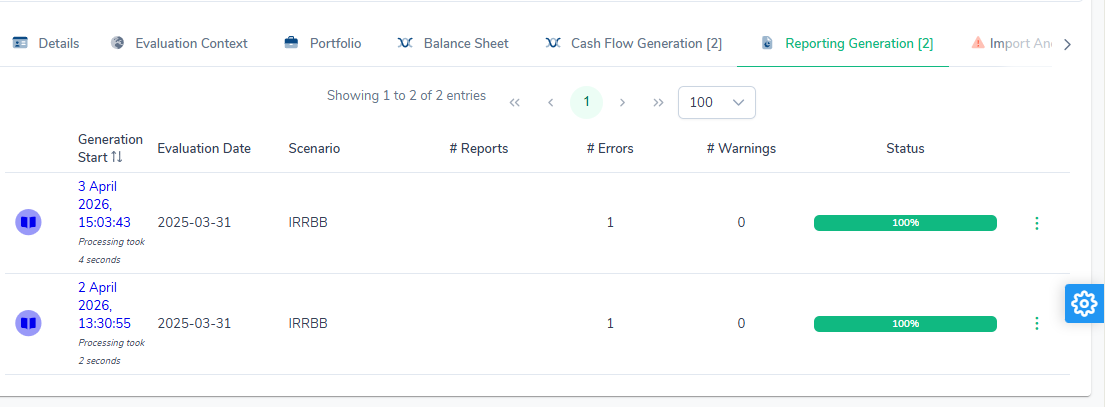
This tab lists the regulatory reporting generations run from this situation. The number of generations is shown in square brackets in the tab label.
| Column | Description |
|---|---|
| Generation Start | Date and time at which processing was launched, with the processing time (e.g. Processing took 4 seconds). The link is clickable and opens the reporting detail. |
| Evaluation Date | Evaluation date used for the reporting. |
| Scenario | Scenario applied (e.g. IRRBB). |
| # Reports | Number of reports generated. |
| # Errors | Number of errors encountered during the generation. |
| # Warnings | Number of warnings raised. |
| Status | Progress bar showing the state of progress or completion (e.g. 100% in green). |
The ⋮ icon at the end of the row opens a context menu containing the Delete option, which permanently deletes the reporting generation.
Like cash flow generations, each reporting generation shows the engine version and calculation version that produced it, and can carry the Older calculation badge: see Engine version and calculation version.
Official run despite import errors
An official run follows the same rule as a simulation: when the situation’s import carries at least one ERROR, it only starts after a confirmation, and the agreement (who, when, counts and codes) is recorded. See Running despite import errors. The agreement is recorded both on the run’s cash-flow generation and on its reporting generation, which returns it with its other information. It is a reservation on the run’s figures: the ALCO pack of that reporting prints it in a “Reservations” section (who accepted, when, and the accepted ERRORs per code, each linked to the Anomaly reference).
Reporting generation detail
This page presents the result of a regulatory reporting generation (IRRBB) launched from an ALM situation. It gives access to the calculated metrics, the reporting templates and the processing logs.
Synthesis & Metrics tab
This tab is displayed by default when the page opens. It presents, in a pivot table, the per-deal metrics calculated during the reporting generation. It is a management view, not a regulatory figure, and its label says so: “EVE and MV: management view, constant balance sheet included, no classification scope, deals without FINREP left out. The IRRBB templates are the reference.”
An Export Metrics button (green file icon) exports the metrics in spreadsheet format.
The metrics are calculated per currency, for the baseline scenario and each of the supervisory shocks: economic value of equity (EVE), 12-month net interest income (NII, the NIM1Y metric, shown as “NIM 1Y”), market value (MV) and their changes relative to the baseline scenario. How they are calculated is detailed in the Metrics chapter of the methodology guide, which also explains why these figures can differ from the templates and the Metrics tab.
The tab’s Help button opens the summary of the metrics next to the table.
A cell’s detail
Double-clicking a figure of the table opens the Synthesis cell detail page. It lists the metrics the cell adds up, by deal and largest first: the deal, which opens on a click if it is still in the portfolio, its contribution and its share of the figure, then, expanding the row, its metrics. The contributions add up exactly to the figure.
The cell is defined by the members of its row and column: a member the row or column leaves out stands for all of them.
These figures are per-deal metrics, outside the regulatory scope: they are not the template figures, which apply the run-off and the classification scope. For those, see Seeing how a figure is computed.
A blank cell opens nothing: it is a group the table refuses to add up. When a filter is set on the table, a message asks to remove it, because the cell’s members no longer describe the filtered figure.
IRRBB Templates tab
This tab displays the IRRBB regulatory template generated during processing, as an interactive spreadsheet embedded directly in the page.
The templates correspond to the EBA IRRBB templates (J 01.00 to J 11.02), filled in per currency. The content of each template and the view used (contractual or behavioural) are described in the EBA IRRBB templates chapter of the methodology guide.
The Help button opens, next to the spreadsheet, the calculation of each row and column of the template on display (J template cell details).
Overriding a figure
The file generated by the engine is never modified. A figure can still be replaced by the one the institution wants to report: the override is stored apart, and the adjusted file is rebuilt on the fly from the generated original and the list of overrides, on every read and every export.
Above the sheet, the Original / Adjusted switch picks the file shown:
- Original: the file as the engine produced it, read-only.
- Adjusted: the same workbook with the overrides written in their cells. Only the white datapoint cells (at the intersection of a row code and a column code) accept input; labels, codes and shaded cells stay locked. Overridden cells are highlighted in yellow.
In the adjusted view, type the figure in the cell, then click Save overrides. The list under the sheet shows, for each overridden cell, the sheet, the cell, the DPM row and column codes, the generated figure, the figure typed, an optional comment, and who saved the override and when. A row’s revert button puts the cell back to the generated figure; Reset to original removes every override of the template, after confirmation. Nothing is stored until you save: switching template or view with unsaved input asks for confirmation.
Each template’s button carries the number of overridden figures.
The export contains the generated files unchanged, plus, for every template that carries overrides, the adjusted workbook in an adjusted/ folder and the full list of overrides in overrides.csv (template, sheet, cell, codes, generated figure, figure typed, comment, user, date).
Points to note:
- An override is a literal value: totals, ratios and the other templates are not recomputed from it.
- Overrides belong to the generation: a new run starts from the engine’s figures again.
- The qualitative templates (J 10.01 to J 11.02) hold text and cannot be overridden.
- A generation still being processed accepts no override.
Seeing how a figure is computed
Every figure the engine writes into an IRRBB template keeps a record of how it was computed. To show it:
- double-click the figure in the original file;
- or select the cell and click Calculation detail, on the original or the adjusted file (on the adjusted file a double-click types an override).
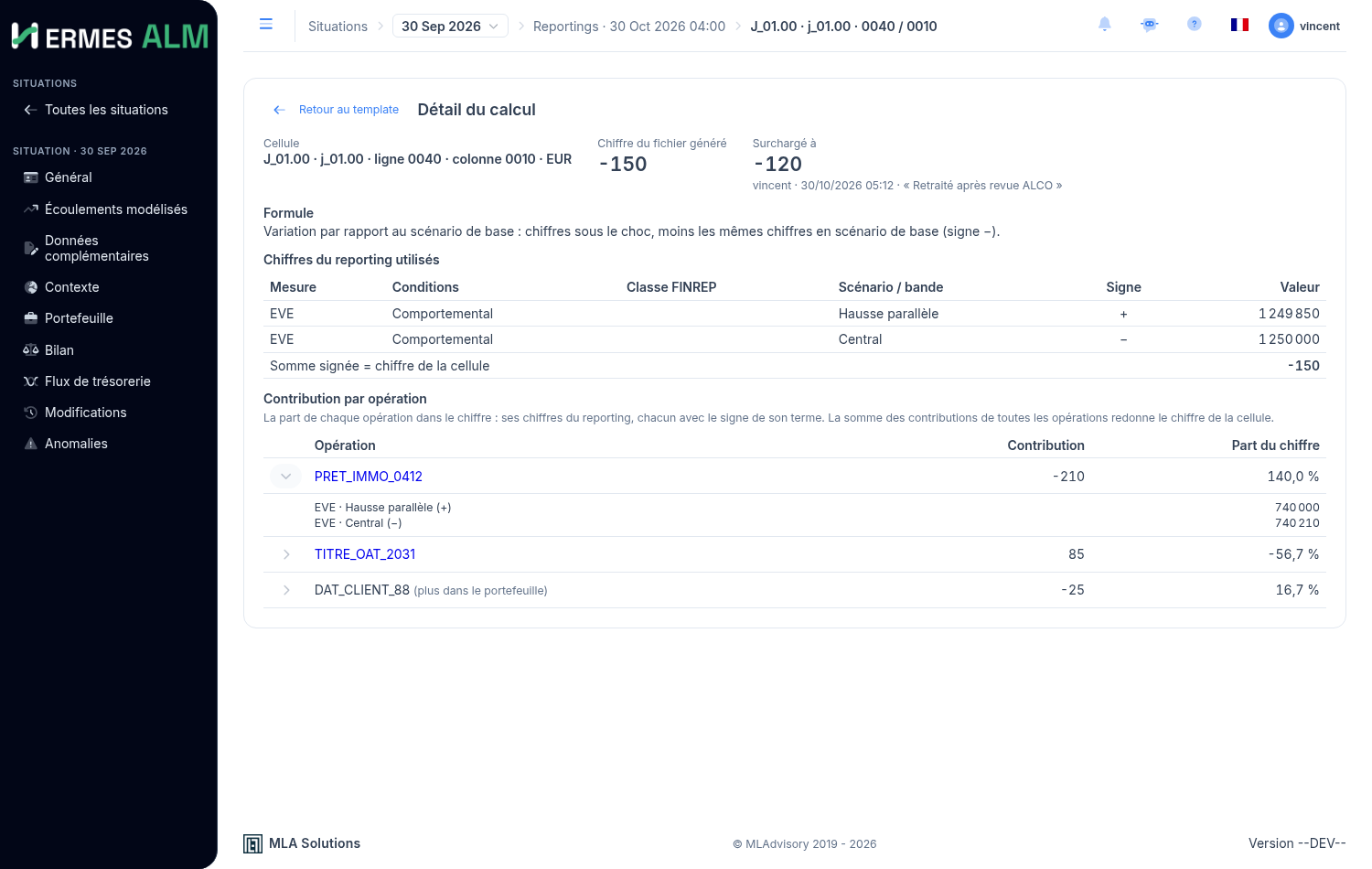
The Calculation detail page shows:
- the cell: template, sheet, DPM row and column codes, currency;
- the figure in the generated file, and the cell’s override if it has one (value, author, date, comment);
- the formula, in words: sum over the row’s class and its sub-classes, change versus the baseline, worst change of the supervisory outlier test, ratio to Tier 1 capital, modified duration, notional-weighted average, notional × declared share, or declared parameter;
- the reporting figures used: for each, the measure (EVE, NII, market value, carrying amount, repricing schedule…), the conditions (contractual or behavioural), the FINREP class, the scenario or bucket, the sign it enters the calculation with, and its value. For a sum or a change, the Signed sum line gives back exactly the cell’s figure;
- the other inputs that do not come from the book: Tier 1 capital, regulatory shock sizes, NMD shares and pass-through rates declared on the situation.
The file shows liabilities positive (ITS convention): when the figure shown has the opposite sign to the engine’s, the page says so.
The engine records this detail while it fills the template; nothing is recomputed. A reporting produced before this feature has none: run the calculation again to get it. Cells the engine leaves empty and qualitative answers (J 10, J 11) have none either.
Contribution by deal
Below the reporting figures, the Contribution by deal section says which deals make the figure. For each, largest first:
- its reference, which opens the deal when it is still in the portfolio;
- when the formula is a sum or a change, its contribution to the figure (its reporting figures, each with its term’s sign) and its share of the figure. The contributions of all the deals add up exactly to the cell’s figure;
- expanding the row, its part of each term.
On the deal’s page, the Source line then gives the file, sheet and row it came from.
The notional of templates J 05 to J 07 nets a class’s positions before taking the absolute value, so a short position shows there as a negative contribution. A carrying amount taken from the balance, and the modified duration (a ratio), do not split between deals.
The engine computes the detail by deal on every IRRBB run. A reporting produced before this feature has none: run the calculation again.
Accounts, positions and flows
For a carrying amount (column 0010 of templates J 02.00 to J 04.00), the page says where the amount comes from and why:
- Accounting balance, when the situation has a balance and a classification. The accounts included are listed with their balance and the row’s sign: their signed sum gives the cell’s figure. The row’s deals appear separately, as a reconciliation: they are not components of the amount. The gap shown is the one anomaly RPT-013 compares, off-balance included.
- Deals, without a balance or on request: the deals then give the figure, in Contribution by deal.
Accounts left out are listed with their reason: off-balance, profit and loss, outside the carrying amount perimeter, no classification line, no FINREP row.
For every measure, Deals left out lists the positions the measure does not count: no FINREP class, outside the measure’s perimeter, or a constant balance sheet renewal after the reporting date. Those renewals still count in the NII.
In Contribution by deal, the Flows button under a deal’s part opens its flows for that term: period, nature, certainty, amount, discount factors and contribution. The sum gives the deal’s part. A flow left out gives its reason:
| Measure | Flow left out |
|---|---|
| EVE | uncertain flow; a flow beyond one year still counts |
| Market value | none, every flow counts |
| NII | not an interest flow, or nothing accrued over the one-year horizon |
Detailed notionals, the carrying amount and the duration are not sums of flows: the page says so. A calculation produced before this feature has neither accounts nor flows: run the calculation again.
Details of a cash flow
In the list of cash flows (the Flows tab of a calculation, or a deal’s cash flow tab, reached from Contribution by deal), the information button of a row opens what the engine read to compute that flow. These values are recorded during the calculation, not computed again for display:
- FX: the pair and the direction it is read in, the quote read on the FX curve at the flow’s period end date, the curve, and the fixing applied (1 / quote when the pair is read as pivot/currency). The amount in the pivot currency is amount × fixing. FX curves are never shocked. A flow already in the pivot currency has no conversion;
- Discounting: the curve and its quotation (ZERO or PAR, a PAR curve being read on its bootstrapped zero rates), the formula
1 / (1 + z)^twithton EXACT_365 from the evaluation date, the zero ratezread and where it comes from: an exact pillar, a linear interpolation between two pillars, or the flat rate of the nearest pillar beyond the curve (CFW-059, CFW-060). Under a scenario, the base rate at the same point and the shock in basis points, floor included. A flow on or before the evaluation date has a factor of 1; - Discounting at the adjusted date, when the adjusted date differs from the contractual one: the same reading at that date;
- Certainty: the rule that decided CERTAIN or UNCERTAIN (capital exchange, fixed rate, floating rate already fixed at the evaluation date or reset after it, floating rate with no index, coupon with no rate, deal not contracted yet or new production) and, for a floating capital flow, why its date was pulled back: to the end of the last certain coupon, or of the first coupon to come when none is running;
- Coupon rate: how it was obtained when it is not the deal’s fixed rate (forward read on the curve, known fixing, prefixed value, last fixing, the deal’s own rate with no curve);
- Share earned over the NII horizon, for an interest flow: the part of its interest period that falls within the year after the evaluation date. Share × amount is the flow’s contribution to the 1-year NII; the exported flow keeps its full amount.
A calculation produced before this feature has no such details: run the calculation again to get them.
Calculation Logs tab
This tab gathers the logs produced while processing the reporting generation. The total number of logs is shown in the tab label.
The logs read in the anomaly log, like those of a cash flow generation: counts per level, search, code-or-type filter, List and By code views. The error types are described on the Running simulations page.
Reporting-specific warnings
Besides the cash flow calculation anomalies, a reporting generation can report the following anomalies; the Anomaly reference describes them all, domain RPT:
| Code | Message | Meaning |
|---|---|---|
| RPT-028 | Cash flow generation finished with ERRORS status and handed no cash flow over; the reporting was not produced. |
Error: the cash flow calculation stopped in error (invalid simulation settings, rejected rate contexts, unexpected failure) and hands no cash flow over. A report on part of the scenarios would give wrong figures, not merely incomplete ones: no template is produced. The cash flow calculation anomalies (WARNING and ERROR) are carried into the reporting logs and give the cause; fix it and run again. A transaction dropped during the calculation (missing curve, failed currency conversion) does not stop it: it is reported and the report is produced without it. |
| RPT-006 | Floating rate repricing cash flows beyond two years have no column in J 05.00 - J 07.00 (… conditions) and are not reported: … |
Floating cash flows fall beyond 2 years, where the floating block has no column: a floating leg with no coupon left to refix its principal. The amount by currency is given; check the transaction’s refixing period (§3.6). |
| RPT-008 | n transaction(s) have no contractual maturity and are left out of the J 05.00 - J 07.00 weighted average maturity (columns 0060 / 0310), notional … |
A single warning per report: these transactions (accounting balance with a bucket law) are left out of the weighted average maturity, but still count in the notional and the average yield (§3.6). |
| RPT-004 | n transaction(s) have no FINREP classification and are excluded from the whole report (J 01.00 - J 07.00 and the transaction metrics): … |
A single warning per report, counting and naming the transactions: those of an accounting category without a FINREP code (category missing from mapping_compta_irrbb or rejected, see Import reference) and those whose cash flows arrive without the transaction in the portfolio. They leave the whole reporting, as the import announces: J 01.00 EVE, NII and market value totals, J 02.00 – J 07.00 rows, carrying amount, maturity and per-transaction metrics. J 01.00 thus stays the sum of the J 02.00 rows, and the report is produced. Fix the classification and import again to bring them back. |
| CFW-014 | No rate on deposit '…'; treated as a non-interest-bearing deposit at a fixed 0 % |
A non-maturity deposit imported without a rate is treated as a non-interest-bearing deposit: zero interest, principal in the fixed-rate block of J 05.00 – J 07.00 (§2.6). |
| RPT-025 | n of m datapoints of <sheet> have no mapped value and were left empty |
One warning per sheet: the engine does not compute these cells, which stay empty rather than 0 (uncomputed cells). The details list the rows and columns. |
| RPT-005 | Missing Tier 1 capital | Without Tier 1 capital declared in the additional data, the J 01.00 ratios (rows 0020 and 0110) are left empty. |
| RPT-013 | Row <row> (EUR): the balance carries …, the deals … of notional; gap … (…%), above the 5% tolerance. |
Carrying amount reconciliation (column 0010): the row’s balance and the notional of the transactions classified on it differ by more than 5%. Check how the row’s accounts and transactions are classified (§3.5). |
| RPT-015, RPT-016 | Balance account <account> '<label>' (<balance>) is in no FINREP row of the carrying amount: … |
A balance account is filed on no row: no mapping_compta line covers it, or its category has no row in mapping_compta_irrbb. Its balance is missing from the carrying amount; complete the classification, or type the account PNL, OBS or DERIVATIVE in the accountingMapping if it is not on the balance sheet (Client configuration). |
| RPT-017 | Balance account <account> '<label>' (<balance>) is filed on row <row> by the classification but typed <type> by the accounting mapping: … |
The classification files on a row an account the accountingMapping types PNL, OBS or DERIVATIVE: it is left out of the carrying amount. Fix whichever of the two is wrong (§3.5). |
| RPT-027 | The filler of template <template> failed, so the template is not produced: <cause> |
The engine could not fill this template, which is missing from the report; the other templates are produced. The cause is the template file is not a readable Excel workbook, or internal error (details in the risk-engine log): report it with the template’s name. Cannot open file … is kept for a template file the engine does not have. |
| RPT-010, RPT-011, RPT-012 | … J 02.00 - J 04.00 column 0010 reports the deals' notional … |
The carrying amount is the transactions’ notional, not the balance-sheet amount of FINREP Annex V §27: the situation has no balance, or carryingAmountSource is DEAL (§3.5). |
ALCO pack
The ALCO pack is the ALM committee’s document. The application produces it from a completed reporting generation, through the Dossier ALCO action, in one of two forms:
- a PDF, organised in numbered sections;
- a PowerPoint deck, where each table and each chart is a slide of its own, titled “section — currency”.
There are four choices:
| Choice | Effect |
|---|---|
| Format | PDF or PowerPoint. |
| Comparison reporting | Optional. Another reporting generation (usually the previous date): each table gains the “Previous date” and “Change” columns, and each chart that date’s bars. |
| Language | French or English. |
| Template | Standard (the template shipped with the application) or one of the institution’s templates: see ALCO pack templates. |
Content
| Section | Content |
|---|---|
| Title page | Title, situation name, as-of date (and the comparison date), generation date. |
| Reservations | Only when the run was launched despite import errors (agreement): the user who accepted, the date and time (UTC), the number of ERRORs, then a table of the accepted ERRORs per code (code, type, count), each code linking to its entry in the Anomaly reference. WARNINGs are not listed. |
| Summary | Per currency: baseline EVE, worst EVE change and its scenario, ratio to Tier 1; baseline 12-month NII, worst NII change and its scenario, ratio to Tier 1; Tier 1 capital. The 15% (EVE) and 5% (NII) thresholds are shown in a separate column. |
| EVE sensitivity | Per currency: a bar chart and a table of the EVE changes per scenario, with the ratio to Tier 1. The six prudential scenarios are marked SOT. |
| NII sensitivity | Same layout for NII; only the two parallel shocks are marked SOT. |
| Carrying amount per FINREP row | Per currency, the carrying amount of each FINREP row. |
| Ledger reconciliation | The number of postes per status, then the postes to review (DIFFERENCE, UNCOVERED, ALM_ONLY) with ledger balance, ALM outstanding and difference. In the deck the list is cut at the first 10 postes; a line says how many remain, to be read in the application. The section is absent when the situation has no reconciliation. |
| Notes | The reporting generation and the engine version the figures come from, and the calculation rules below. |
Calculations
The figures are those the engine stored in the reporting generation, in the behavioural view only: per currency, EVE and NII per scenario (levels), the carrying amount per FINREP row, and the Tier 1 capital declared in the situation (capitalAmount). The pack derives, by the rules of methodology §3.4:
- changes: scenario minus baseline (
BASELINE); - the worst shock: the largest decrease over the six prudential scenarios for EVE, over the two parallel shocks for NII;
- ratios: change divided by Tier 1. Without a declared Tier 1, no ratio is computed and the summary says so.
The 15% and 5% of Tier 1 thresholds are those of the supervisory outlier test; they are shown for reference, no limit is applied.
The ledger reconciliation is that of the situation’s Reconciliation sub-tab, computed with the default tolerance of 1.
Refusals and errors
| Case | Effect |
|---|---|
| The reporting generation (or the comparison one) has no result yet | Refused: the pack cannot be produced. |
| The situation’s ledger reconciliation cannot be computed | The pack is produced without that section. |
| The layout service does not answer, or fails | Error: no file is produced. Try again, and report it if the error persists. |
When the pack is produced without a section or with empty tables (no ledger reconciliation, no behavioural view), a notification says so before the download, with the link to each code’s entry (see Where the warnings are shown).
Limits
- The deck uses the default PowerPoint template until a template of the institution’s own (masters, colours, fonts) is installed.
- Amounts are not converted between currencies: each currency has its own tables.
- The pack takes the levels stored in the reporting generation. If the engine has changed since (
Older calculationbadge), rerun the reporting to get the current engine’s figures.
ALCO pack templates
The pack’s content and layout are described by a template. The application ships the Standard template, which produces the pack described above; an institution can have templates of its own, chosen when the pack is downloaded.
What a template is
A template is a Quarto document (.qmd): Markdown text, headings and Python cells run at render time. The cells load the pack and print its blocks (tables, charts); they can also make computations of their own, with pandas and matplotlib.
Example, a one-page note:
---
format:
  typst:
    papersize: a4
---

```{python}
#| include: false
from alco import Dossier
d = Dossier.charger()          # the reporting, situation, language and format asked for
c = d.chiffres("EUR")          # the euro's raw figures
```

# Note to the committee

The worst EVE change is `{python} d.millions(c.eve_pire)`,
that is `{python} d.pourcent(c.eve_ratio)` of Tier 1.

```{python}
#| output: asis
print(d.graphique("EUR", "eve"))
print(d.tableau_sensibilite("EUR", "eve"))
```- A cell marked
#| include: falsecomputes without showing anything. - A cell marked
#| output: asisprints Markdown: that is how the blocks enter the document. - A value in
`{python} …`goes into a sentence.
The Standard template works the same way: one cell goes through the currencies and prints the summary, the sensitivities, the carrying amounts, the reconciliation and the notes.
What a template can use
d. |
Content |
|---|---|
devises, arrete, arrete_precedent, situation, tier1, lang, deck |
The pack: currencies present, dates, situation, Tier 1, language, True for the deck. |
t, scenarios |
The labels in the pack’s language (d.t.summary…) and the scenario names. |
chiffres(devise) |
A currency’s raw figures: EVE and NII changes per scenario, eve_pire, eve_pire_scenario, eve_ratio, the same for NII, the carrying amount per FINREP row, and each as …_precedent for the comparison date. |
snapshot |
All the data received, as is. |
entete() |
The dates line under the title (empty in the deck). |
titre(section, sous_titre) |
A section heading in the PDF, a slide title in the deck. |
tableau_synthese(devise), graphique(devise, "eve" or "nii"), tableau_sensibilite(devise, …), tableau_encours(devise) |
The Standard pack’s blocks. |
tableau_rapprochement(), postes_a_examiner(), notes() |
The reconciliation and notes blocks. |
reserve, reserves() |
The run’s agreement (None without one) and the Standard pack’s “Reservations” block. |
millions(v), variation(v), pourcent(v), nombre(v, decimals) |
Amounts and rates formatted in the pack’s language. |
texte(label) |
A label from the data, made safe for Markdown. |
The application sets the title, the subtitle (the situation’s name, and the dates in the deck), the language and, when installed, the institution’s PowerPoint template. The template decides the rest: formats, margins, content.
PDF or deck. One template serves both formats. In the deck, each heading given by titre() starts a new slide: give each table and each chart a heading of its own so that they do not share a slide.
Who can edit a template
Any user can choose a template when downloading the pack. Only MLAdvisory’s template editors, named in the application’s configuration (application.alco.template-editors), can create, edit, delete or preview one.
The reason: a template is Python code run on the server at render time. Letting a user write one would let them run any program on the infrastructure. An institution’s administrators therefore choose among the templates but do not write them; ask MLAdvisory for any change.
Editing and previewing
Templates are edited in Configuration › ALCO pack templates.
| Item | Role |
|---|---|
| Template list | The institution’s templates. New starts from the Standard template, Duplicate copies the selected one, the bin deletes it (after a confirmation). |
| Template name | The name offered when the pack is downloaded, unique in the institution. |
| Editor | The Quarto document, highlighted. The collapsible Writing a template panel recalls how to load the pack, the #| output: asis option and the available blocks. |
| Preview | Pick a Situation, one of its computed Reportings and the format, then Preview: the template being edited is rendered without being saved. The PDF shows in the page; the deck is downloaded. |
A user who is not a template editor sees the page read-only, with the message “Reserved to MLA’s template editors”.
When a cell fails, no preview is produced and the editor shows the diagnostic: the failing cell, then the Python error. Example:
An error occurred while executing the following cell:
------------------
x = 1/0
------------------
ZeroDivisionError                         Traceback (most recent call last)
----> 1 x = 1/0
ZeroDivisionError: division by zero
The last line gives the cause; the ----> arrow points at the faulty line in the cell. The same error occurs when a pack is downloaded with a saved template that fails: fix the template, or choose Standard.
A render is stopped after two minutes.