Running Simulations
Cash Flow Generation tab

This tab lists the cash flow generations launched from this situation. The number of generations is shown in square brackets in the tab label (e.g. Cash Flow Generation [2]).
| Column | Description |
|---|---|
| Generation Start | Date and time the calculation was launched, with the processing time (e.g. Calculation took 54 seconds). The link is clickable and opens the generation details. |
| Evaluation Date | Evaluation date used to calculate the cash flows. |
| Scenario | Stress scenario applied (e.g. IRRBB). |
| # Cashflows | Total number of cash flows generated. |
| # Errors | Number of errors encountered during the generation. |
| # Warnings | Number of warnings raised during the generation. |
| Status | Progress bar showing the percentage of progress or completion of the calculation (e.g. 100% in green). |
The ⋮ icon at the end of the row opens a context menu containing the Delete option, which permanently deletes the cash flow generation.
When a generation fails
A cash flow generation that ends in ERRORS is announced by a Cash Flow generation failed notification, shown as a failure in the notification list. Its anomalies (# Errors column, generation details) give the cause.
A generation or a reporting still running after 2 hours without an answer from the calculation engine is stopped: it goes to ERRORS with an anomaly of type Timeout (“risk-engine did not answer within 2 hours; the run is marked failed…”, RUN-009) and a Cash Flow generation failed or Report Generation failed notification. The delay is a setting of the installation. Run the calculation again; if it fails the same way, contact support.
Running despite import errors
When the situation’s import carries at least one anomaly of level ERROR, launching a calculation, a simulation (cash-flow generation) or an official run (IRRBB reporting), asks for a confirmation. The application then shows the number of the import’s anomalies, per level and per code; each code links to its entry in the anomaly reference. Older anomalies, stored before codes existed, are counted under the code their message is recognised as; those no code recognises are grouped by type. WARNINGs are listed but never block.
Two choices are offered: run anyway, or look at the import’s anomalies first. The server refuses a launch without this confirmation, whichever screen or tool asks for it.
A calculation run despite errors records the agreement on the generation:
| Information | Content |
|---|---|
| User | Identifier, user name, name and e-mail address of the person who confirmed, as their account gives them. |
| Date | Date and time of the confirmation. |
| Counts | Number of the import’s ERRORs and WARNINGs at that moment. |
| Codes | The breakdown per code (level, type, count) of the ERRORs and WARNINGs shown. |
The agreement stays attached to the generation and never changes, even if the import is corrected afterwards. An official run also carries it on its reporting generation (see IRRBB Reporting Generation). An import without ERROR asks for no confirmation, and the generation then records no agreement.
Only the import’s own anomalies are counted. The file-by-file checks of the guided import are left out: an import with a file in error cannot be submitted, and the import of the archive reports again whatever those checks found.
Run input and replay
When a generation is launched, a simulation as well as an official run, the application assembles the run input (RunInput): the situation’s portfolio at its current revision (added or edited deals included), classified with the client configuration (Classification at import and at run launch), the evaluation context and its curves, the arrêté, the whole client configuration and the simulation’s assumptions. It writes it once in the tenant’s object store (S3), under alm/<tenant>/runs/<run>/input.json, and never rewrites it.
The calculation engine reads that input and nothing else: it reads neither the situation, nor the configuration, nor the imported files. It writes its results next to it, in blocks under runs/<run>/result/, with a manifest.json that lists them; the application loads them from that manifest. Deleting a generation deletes these objects. A missing or unreadable input stops the run (RUN-025), as does an engine that does not read the input’s contract version (RUN-024).
The engine receives no other calculation request: the cash-flow generation, the official IRRBB run and the API’s solvency calculation (POST /api/v1/risk/solvency/generate/portfolio/{id}/context/{contextId}, on the portfolio, its deals and the context) are all runs on such an input.
Recalculating a generation
A generation whose input is stored can be recalculated: a new generation is created on a copy of the same input (same situation revision, same configuration revision, same assumptions, same agreement on the import’s anomalies) and computed by the engine deployed today. Only the calculation changes: a difference between the two generations comes from the engine’s evolution, not from the data. A recalculated official run also produces its reporting. The original generation stays in the list.
The Recalculate (Recalculer) button shows, in the situation’s list of cash-flow generations, under the Older calculation badge of each generation that carries it; the engine-changed banner offers the same action for the last official run. It launches the recalculation (POST /api/v1/generation/cashflows/{id}/recalculate, which answers the new generation’s id) and opens the new generation at once: while it is computed, its page says so (“This run is being computed; the page refreshes once it is done.”) and updates itself when the calculation ends.
A generation launched before run inputs were stored has no input: the recalculation is refused. A This run cannot be recalculated dialog gives the server’s reason (“This run was launched before runs by reference and kept no input; launch it again instead.”) and offers Launch a new run, which opens the launch dialog of the same kind of generation. The same goes when the input is no longer in the object store.
Recalculating takes the data as it was at the original launch. For an Obsolete generation, whose situation changed since, launch a new generation: that is the one that takes the current data into account.
Engine version and calculation version
Every cash flow generation and every reporting generation records the calculation engine that produced it. The following two values are shown in the list of generations and in the header of a generation’s details:
| Label | Description |
|---|---|
| Engine version | Build version of the engine: the artifact version followed by the commit (e.g. 1.0.0-SNAPSHOT+3f2a9c1). It identifies exactly which engine made the calculation. |
| Calculation version | An integer the engine team increases with every change that alters the figures produced. A change that does not alter figures (performance, logging, a fix with no effect on results) does not increase it. Each calculation version comes with a one-line note of what changed. |
Generations launched before these versions were recorded show Unknown.
Older calculation badge
A generation whose calculation version is lower than the engine’s current calculation version carries the Older calculation badge. Its tooltip reads: “Computed with an older calculation version — recalculate to get the current figures.” Its figures are no longer those the engine would produce today: the Recalculate action gets them, on the same data (Recalculating a generation).
A generation launched before versions were recorded (version Unknown) also carries the badge as soon as the current calculation version is known: nothing shows that it was computed with the current calculation.
The current calculation version is the one of the deployed engine. The engine announces its version to the application every time it starts, and the application also asks for it when the application starts. Right after a new engine is deployed, before anybody re-runs a generation, the application therefore knows the current calculation version, and the badge is right from that moment.
After a rollback to an older engine, the deployed engine’s version becomes the current one: generations made by the newer engine are not flagged as outdated.
This badge is distinct from the Obsolete badge, which means the situation’s data changed since the generation. Older calculation means the calculation itself changed. A generation can carry both badges: Recalculate clears the first, only a new generation clears the second.
Warning: the engine has changed since the last run
On a situation’s detail page, a warning banner appears when the situation’s last official run was computed with an older calculation version than the current engine’s. The cash flows and the reporting of an official run are produced together, so they count as one run, and the banner is the same in the Cash flows and Reportings sections. The last official run is the latest one whose cash flows and reporting both succeeded: a failed run is skipped, and custom simulations are not taken into account. The banner shows when the cash flows or the reporting of that run are outdated, and stays hidden while a newer official run is in progress. It reads:
The calculation engine has changed since the last run (version x → y, deployed on date)
followed by the note of what changed in the calculation, and a Recalculate action, which recalculates that last official run, cash flows and reporting, with the current engine (Recalculating a generation).
Runs made before engine versions were recorded (before 27/10/2026, version Unknown) count as older once the current version is known. The banner then says so with the wording “… made before engine versions were recorded”.
What to do: click Recalculate to get figures from the current calculation. The previous run stays available in the list of generations.
Cash Flow Generation details
This page presents the full result of a cash flow generation launched from an ALM situation. It gives access to the portfolio used, the calculated cash flows, the liquidity gaps, the per-deal metrics, the stress scenarios, the data access script and the calculation logs.
Portfolio tab
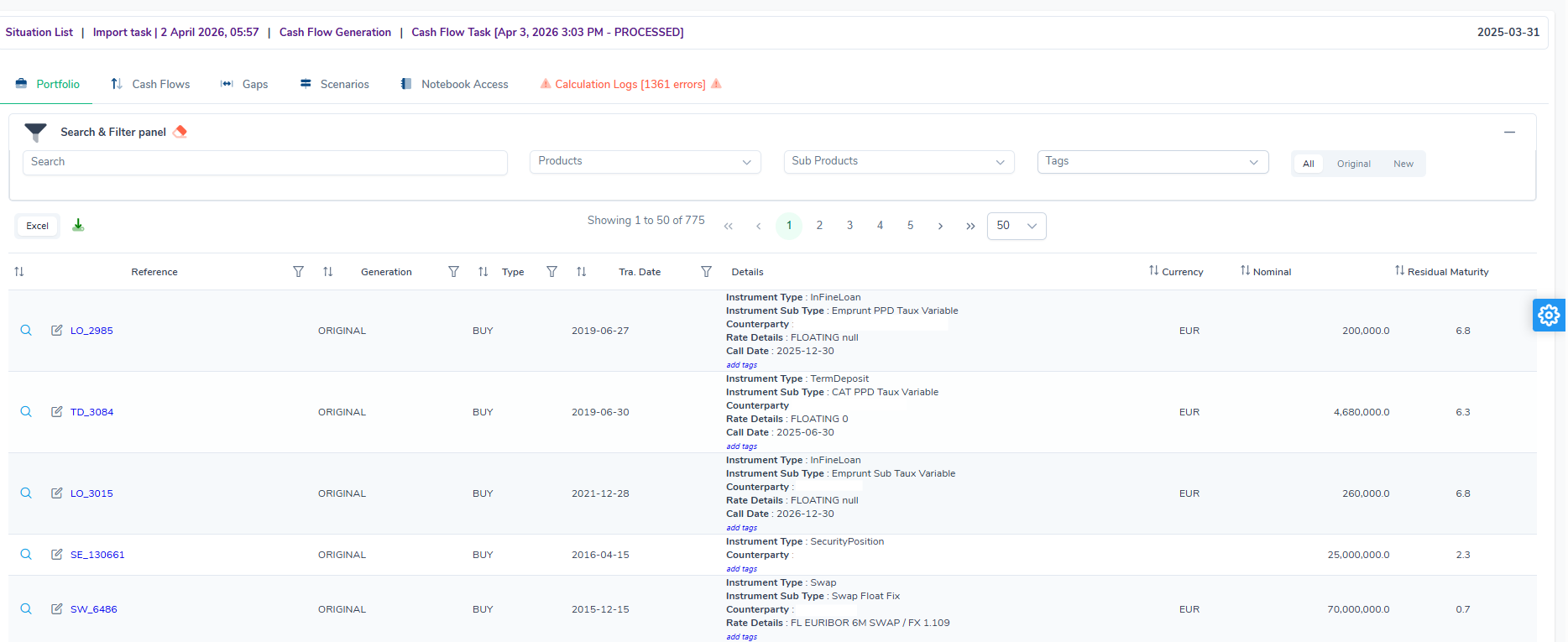
This tab lists the financial instruments of the portfolio as they were used in the generation. It is identical to the Portfolio tab of the ALM situation (see Portfolio tab), with the same filter panel and the same columns: Reference, Generation, Type, Tra. Date, Details, Currency, Nominal, Residual Maturity.
Cash Flows tab
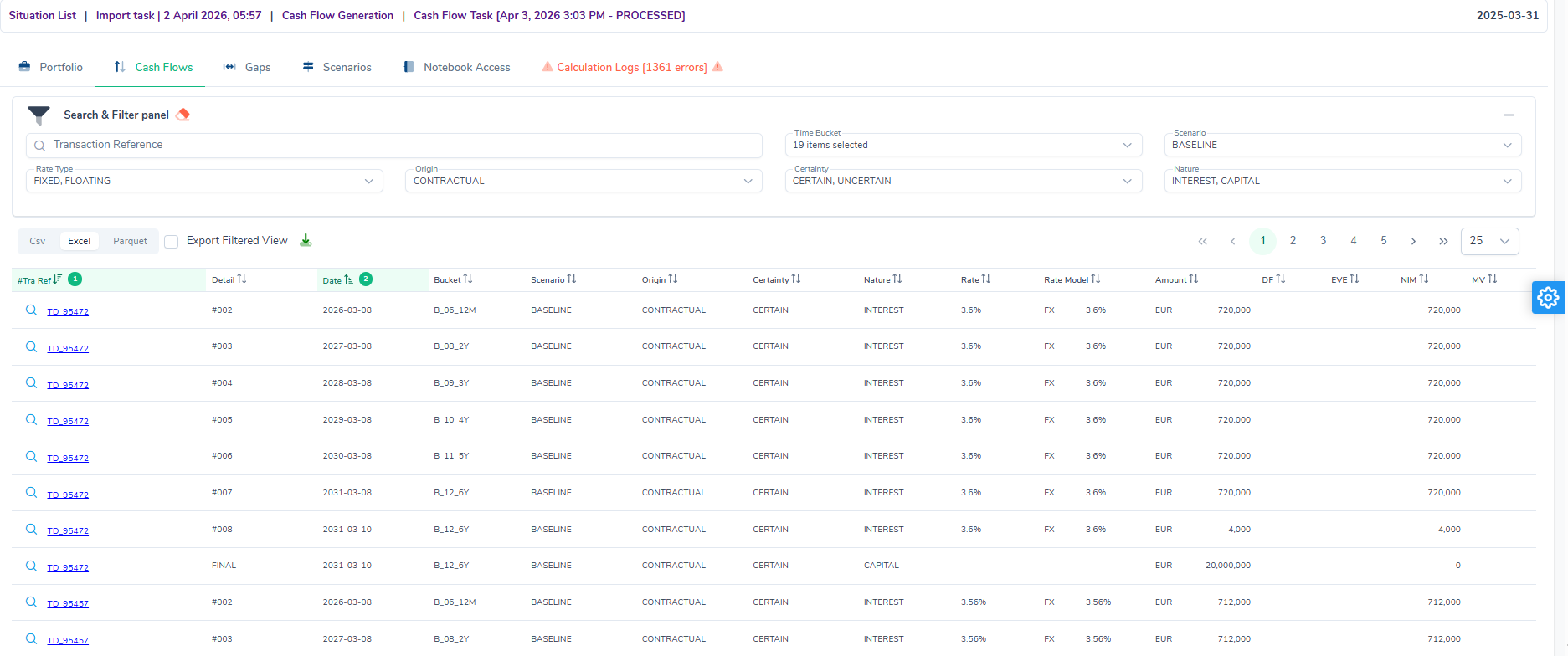
This tab displays the detailed list of all generated cash flows.
Available filters
| Filter | Description |
|---|---|
| Transaction Reference | Search by transaction reference. |
| Time Bucket | Selection of the time buckets to display. |
| Scenario | Calculation scenario applied (e.g. BASELINE). |
| Rate Type | Rate type of the cash flows (e.g. FIXED, FLOATING). |
| Origin | Origin of the cash flow (e.g. CONTRACTUAL). |
| Certainty | Certainty level (e.g. CERTAIN, UNCERTAIN). |
| Nature | Nature of the flow (e.g. INTEREST, CAPITAL). |
Exports are available in CSV, Excel and Parquet formats. An Export Filtered View checkbox restricts the export to the filtered data.
Table columns
| Column | Description |
|---|---|
| $Tra Ref | Transaction reference (clickable link to the details). |
| Detail | Flow number or payment type (e.g. #002, FINAL, InFine Interest Payment). |
| Date | Cash flow date. |
| Bucket | Time bucket the flow belongs to (e.g. B_06_12M, B_12_6Y). |
| Scenario | Scenario applied (e.g. BASELINE). |
| Origin | Contractual or modelled origin. |
| Certainty | Certainty level of the flow. |
| Nature | Nature of the flow: interest or capital. |
| Rate | Rate applied to the flow. |
| Rate Model | Rate model used (e.g. FX). |
| Amount | Cash flow amount in the instrument currency. |
| DF | Discount factor applied. |
| EVE | Contribution to the Economic Value of Equity. |
| NIM | Contribution to the Net Interest Margin. |
| MV | Market value of the flow. |
Gaps tab
This tab presents an analysis of liquidity gaps (differences between cash inflows and outflows) over the calculation horizon.
When the gap, its report or the metrics rely on a default rule (no pivot currency, comparison generation chosen by the solution…), a warnings banner is shown above the result, with the link to each code’s entry (see Where the warnings are shown).
Available filters
| Filter | Description |
|---|---|
| Scenario | Selected scenario (e.g. BASELINE). |
| From / To | Date range of the analysis. |
| W / M / Q | Time granularity: weekly, monthly or quarterly. |
| Currencies | Filter by currency. |
| Tags | Filter by tags. |
| Reference | Filter by transaction reference. |
| Product | Filter by product type. |
| Show cumulative | Checkbox to display cumulative values. |
Chart sub-tab
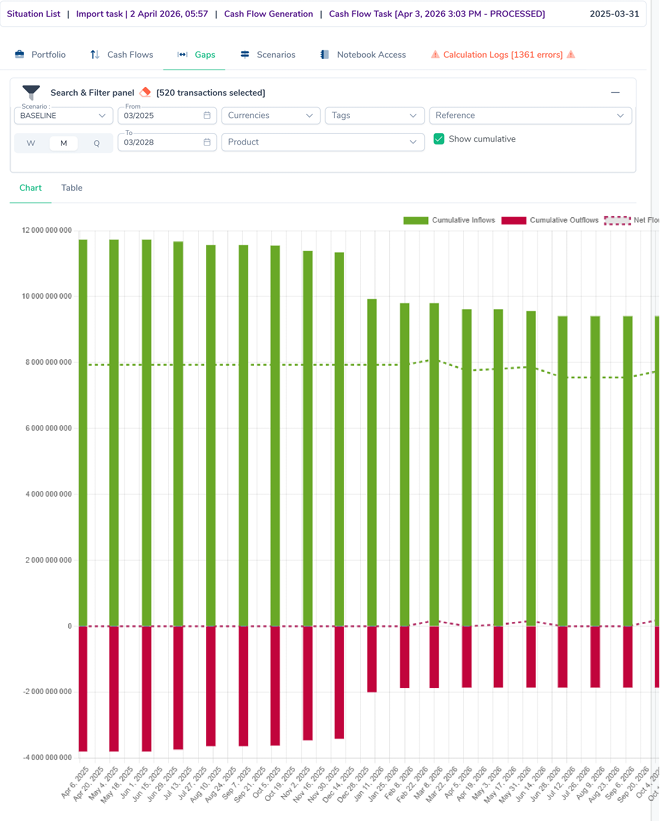
Displays a bar chart showing, for each period:
- Cumulative Inflows (green bars): cumulative cash inflows.
- Cumulative Outflows (red bars): cumulative cash outflows.
- Net Flows IF-OF (dotted green line): net flows.
- Cumulative Net Flows IF-OF (dotted grey line): cumulative net flows.
Table sub-tab
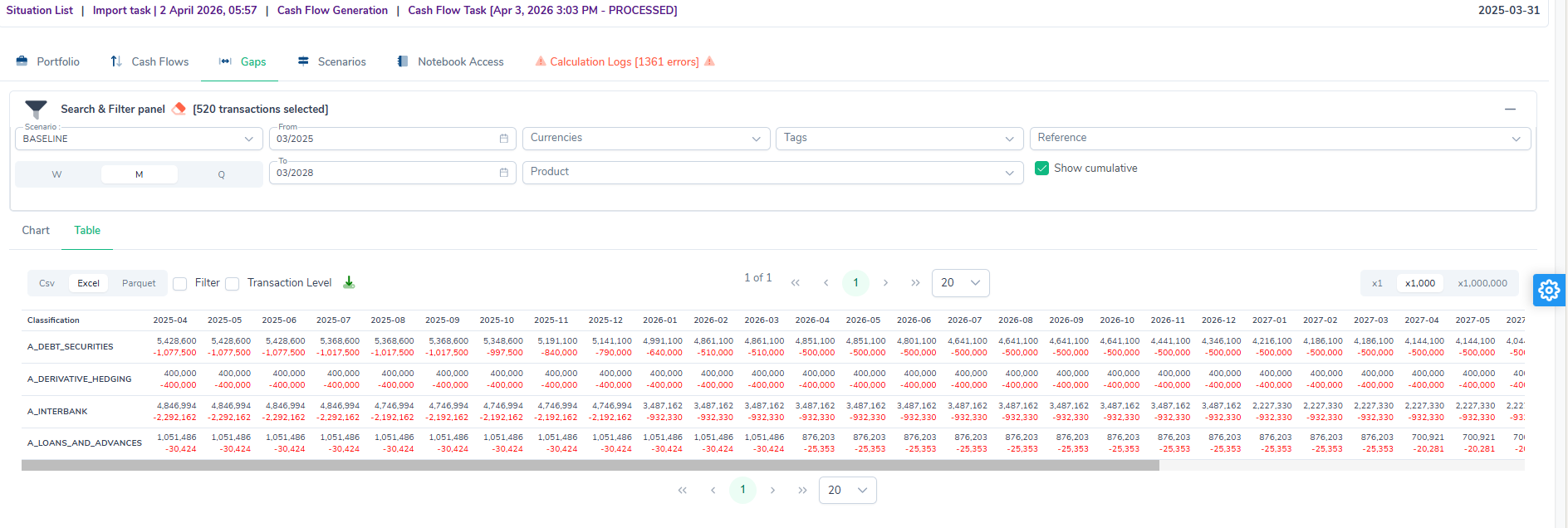
Displays the same data as a cross-table by Classification (e.g. A_DEBT_SECURITIES, A_INTERBANK, A_LOANS_AND_ADVANCES) and by time period. Negative values are shown in red. Exports are available in CSV, Excel and Parquet formats.
A gap figure’s detail
Double-clicking a figure of the Table sub-tab or of the IRRBB report opens the Gap figure detail page. It restates the cell (classification, period or band, measure) and the figure, then its formula. It keeps the filters of the gap on screen.
For a figure of a classification, the Deals section lists what makes it, largest first:
- the deal, which opens on a click, its contribution to the figure and its share of the figure. The contributions add up exactly to the figure;
- expanding the row, its capital flows: date, period start, hedge role, amount in pivot currency, weight and contribution.
Which flows count depends on the measure:
| Measure | Flows counted |
|---|---|
| Inflow, outflow, net flow | Those of the period: positive, negative or all. |
| Cumulative inflow or outflow | Positive or negative, up to this period in the chosen direction. |
| Opening outstanding | Those of the period and of all later ones. |
| End-of-period outstanding | Those of later periods only. |
| Average outstanding | Those of later periods, plus those of the period at weight ½. |
A zero-amount flow changes no figure and is not listed. In the Table sub-tab, a classification holding several hedge roles is summed, so its detail lists the flows of all of them. The report keeps them apart, and each of its rows opens its own role’s detail.
The report’s published lines (end-of-period gap, gap before and after hedging, hedge contributions) are formulas: the page shows the figures used, each with its sign and a link to its own detail, rather than a list of flows. The comparison lines with the previous month, and the chart, open no detail.
Metrics tab
This tab presents the generation’s metrics by deal and by scenario, for one origin at a time (behavioural by default), in the pivot currency.
| Column | Content |
|---|---|
| EVE | Present value of the certain cash flows, at their repricing date. |
| NII (12 months) | The engine’s NII (NIM1Y): interest accrued over the 12 months following the reporting date (§3.3). |
| Total interest over the whole life | Undiscounted cash sum of all the deal’s interest flows. It is not an NII. |
| MV | Present value of all the cash flows, at their payment date. |
It is a management view, and its label says so: “EVE and MV: management view, constant balance sheet and deals without FINREP included. The IRRBB templates are the reference.” These figures can therefore differ from the reporting synthesis and the templates: §3.9 gives the causes and an example.
The metrics tab of the deal page shows the same measures, and adds “Interest paid within one year” and the one-year market value. The situation comparison carries the same label.
When a calculation recorded no NII decision for a deal, the column shows “—” and a message asks to run the calculation again.
The CSV, Excel and Parquet exports carry these measures under the following names, which replace nim, nimOneYear and deltaNim:
| Exported column | Content |
|---|---|
earnedNii, deltaEarnedNii |
NII (12 months) and its change from the reference scenario. Empty when the calculation recorded no decision. |
wholeLifeInterest, deltaWholeLifeInterest |
Total interest over the whole life and its change. |
oneYearCashInterest |
Interest paid within one year. |
Scenarios tab
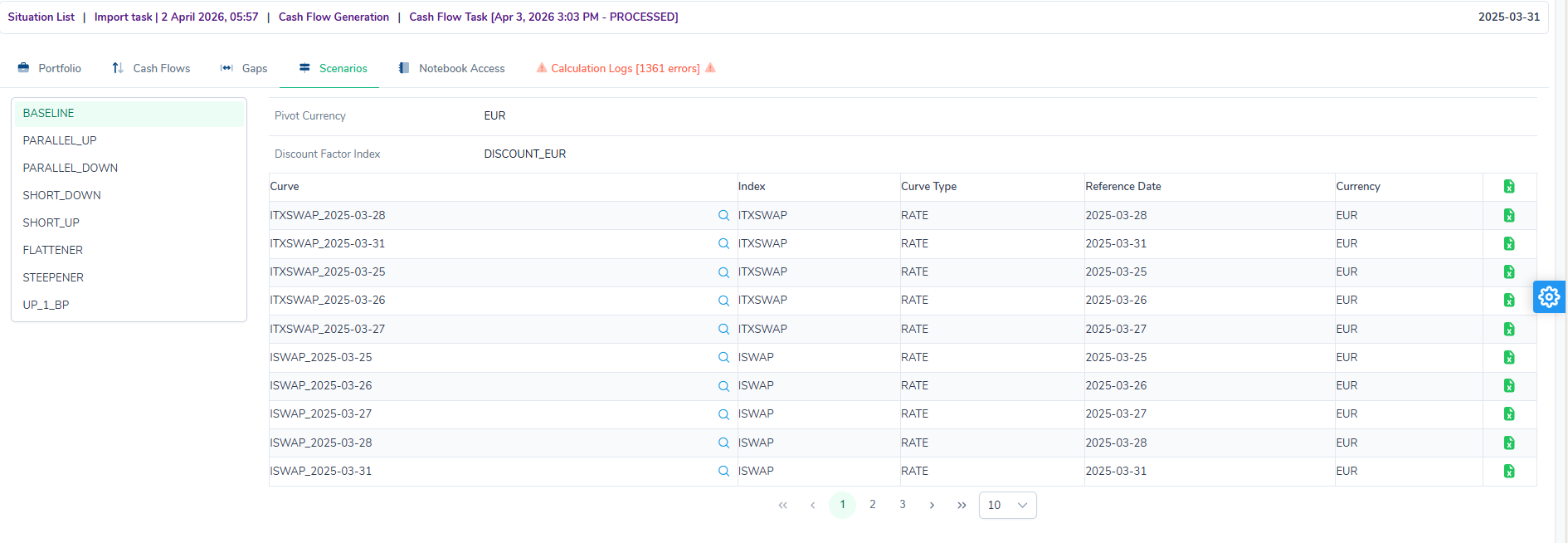
This tab displays the evaluation context parameters for each stress scenario applied in the generation.
A list of scenarios is shown on the left (e.g. BASELINE, PARALLEL_UP, PARALLEL_DOWN, SHORT_DOWN, SHORT_UP, FLATTENER, STEEPENER, UP_1_BP). For a custom simulation, the list holds only BASELINE, the chosen scenarios and, where defined, CUSTOM. When a scenario is selected, the right-hand panel displays:
- Pivot Currency: reference currency of the scenario.
- Discount Factor Index: discounting index used.
- The table of yield curves associated with the scenario, with the columns Curve, Index, Curve Type, Reference Date, Currency.
Notebook Access tab
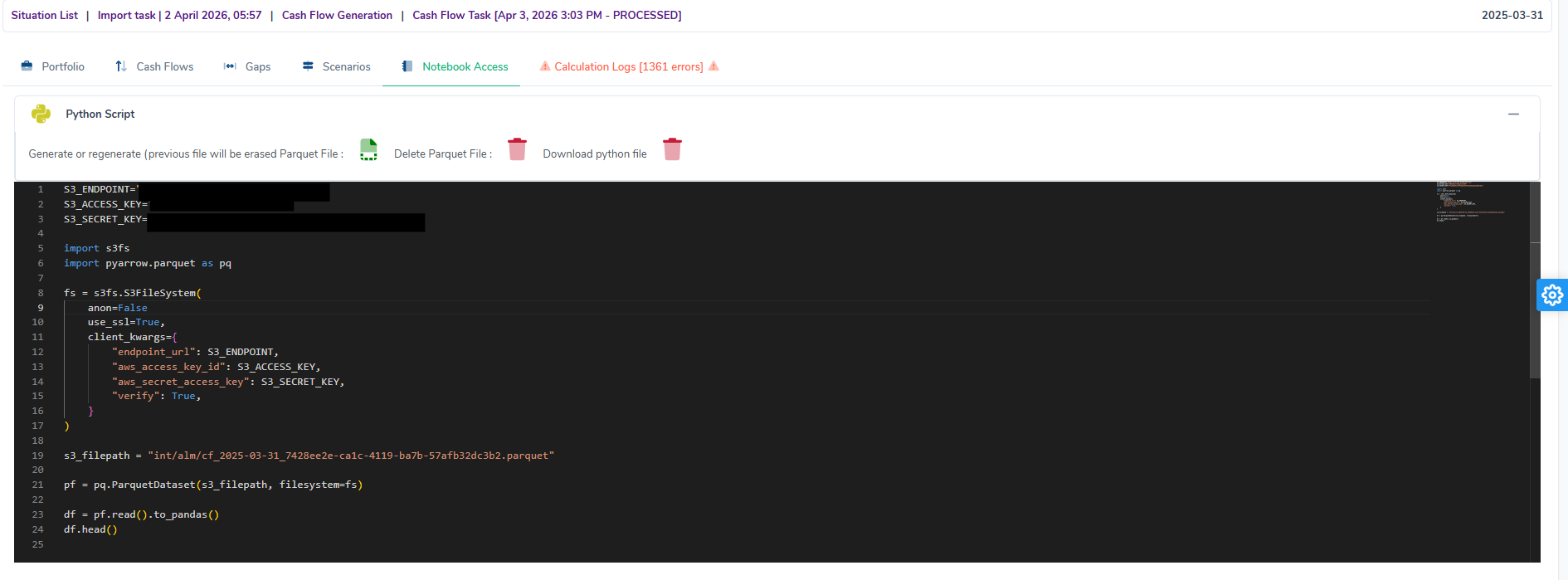
This tab provides a ready-to-use Python script to access the generation data stored in Parquet format on the S3 server.
Three actions are available in the header:
- Generate or regenerate Parquet File: generates or regenerates the Parquet file associated with the generation (the previous file is overwritten).
- Delete Parquet File: deletes the existing Parquet file.
- Download python file: downloads the Python script displayed.
The script displayed automatically configures the S3 connection with the parameters S3_ENDPOINT, S3_ACCESS_KEY and S3_SECRET_KEY, then loads the data into a pandas DataFrame via pyarrow.parquet.
Calculation Logs tab
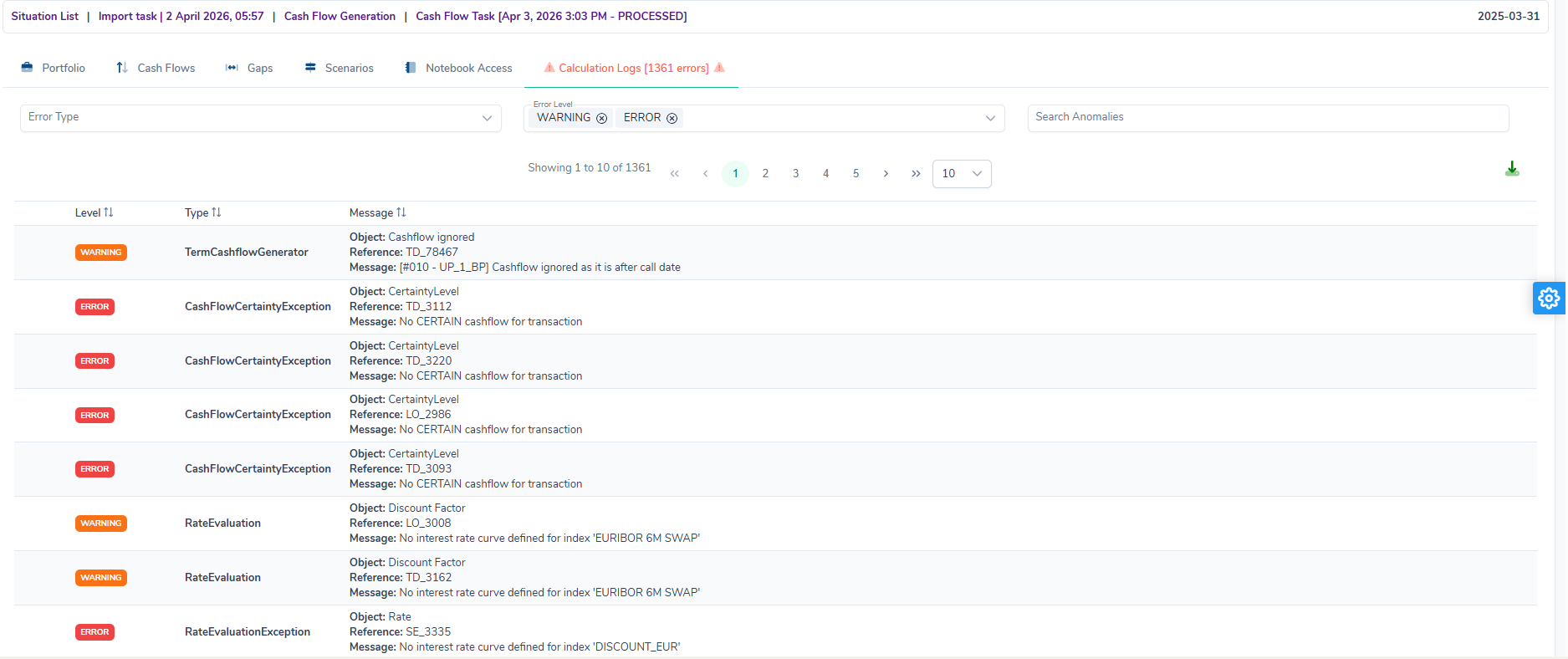
This tab gathers all the calculation logs produced during the generation. The total number of logs is shown in the tab label. An alert icon indicates the presence of anomalies.
Available filter
The logs read in the anomaly log, the same for every anomaly screen: counts per level that filter, a search over message, reference and code, a Code or type filter, the List and By code views and the Excel export. Above 50 logs, the log opens on the By code view, which groups identical logs: one row per code, or per type and message, with its number of occurrences.
Table columns
The List view shows Level, Code (a link to the code’s entry in the anomaly reference), Reference and Message; the type, the object and the details unfold under the row.
Calculation Logs error types
The main error types, available through the Code or type filter, are described below. Each log also carries a code, described in the Anomaly reference: domain RUN for the errors that stop the whole generation, CFW for the cash flows, curves and rates of each deal.
| Type | Level | Object | Description |
|---|---|---|---|
| TermCashflowGenerator | WARNING |
Cashflow ignored |
A cash flow was ignored because it falls after the call date of the instrument. Expected behaviour for callable instruments. |
| CashFlowCertaintyException | ERROR |
CertaintyLevel |
The engine could not determine a certain cash flow for the transaction (No CERTAIN cashflow for transaction). May affect liquidity analyses. |
| RateEvaluation | WARNING |
Discount Factor |
No yield curve is defined for the index used to calculate the discount factor (e.g. EURIBOR 6M SWAP). Non-blocking. |
| RateEvaluationException | ERROR |
Rate |
The engine failed to evaluate the rate of an instrument because a discount curve could not be found (e.g. DISCOUNT_EUR). Check the index mapping in the evaluation context. A curve of the context with no point reads Rate curve '<curve>' (index <index>) has no points, so no rate can be read from it. (CFW-024, CFW-028, CFW-051) |
| UnsupportedCashFlow | ERROR |
FLOATING_RATE_UNSUPPORTED, RATE_TYPE_MISSING or RATE_VALUE_MISSING |
The transaction’s cash flows were not generated, for a cause the engine names: Cash flows of transaction '<reference>' could not be generated: <cause>., the cause being its rate is floating, and this interest flow is only computed for a fixed rate, its rate is neither fixed nor floating, so its interest cannot be computed, or its rate is fixed but has no value, so its interest cannot be computed. Check the rate type and rate of the transaction. (CFW-052, CFW-053, CFW-054) |
| CashFlowException | ERROR |
Rate |
The transaction’s cash flows were not generated; the message gives the cause, for instance a balance-sheet line with no run-off law: Cash flows of this balance-sheet line could not be generated: it has no run-off (outflow) strategy. (or its run-off strategy '…' is neither linear nor by time bucket.). Check the run-off model (Import reference). (CFW-055, CFW-056) |
| UnexpectedError | ERROR |
?? |
Last resort for a failure the engine did not foresee: Cash flows of this transaction could not be generated: internal error (details in the risk-engine log). Report it with the transaction’s reference. (CFW-004) |